


Learning Genie for Parents
4.9361.00 Reviews
App Specs
- Version
- 5.0.29
- Updated On
- License
- Free
- Downloads
- 100,000+
- Developer
- Learning Genie Inc
- Categories
- Education
- Platform
- Android
Screenshots
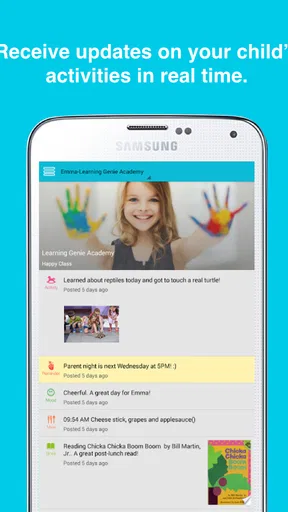
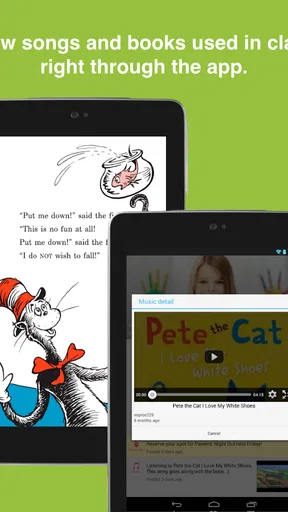
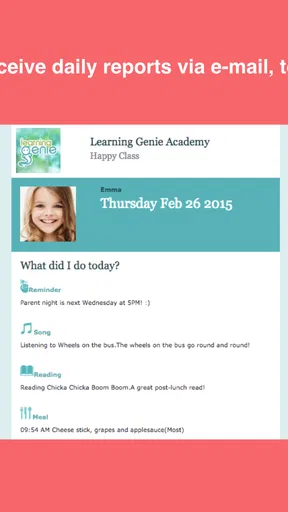
 Analysis by AppCompare
Learning Genie for Parents is the kind of education app I would judge less by flashy activities and more by how well it fits the small moments between home and a child’s early-learning setting. Its purpose is to help parents stay involved through photos, daily reports, and related updates, so the real value comes from making communication easier to notice and act on. I found it most useful as a bridge between what happens during the day and what a parent can continue at home.
It is a free education app from Learning Genie Inc, available for Everyone and compatible with Android devices running version 5.0 or later. The app has built a sizeable audience, with over one hundred thousand installs, a 4.9 average from around one thousand six hundred ratings, and three hundred sixty-one written reviews. Those figures suggest that many families find the basic idea worthwhile, although they do not remove the need to consider whether its communication style matches your child’s school or care setting.
How Learning Genie for Parents fits into everyday family communication
The first thing I noticed is that this is not trying to replace a full learning platform, a video lesson service, or a general-purpose family messenger. Its role is narrower and, in my opinion, more practical: it gives parents a place to follow early-learning information as it arrives. A photo can show what a child actually did, while a daily report can provide context that a quick conversation at pickup may miss.
That distinction matters. Many parents already receive messages through email, text, paper notes, or a school portal. The problem is not always a lack of communication; it is that useful details become scattered. A dedicated parent-facing app can make those updates easier to revisit, especially when a parent wants to remember what happened earlier in the day before asking a child about it.
I would describe the experience as a communication companion for early learning rather than a standalone teaching tool. Parents who expect games, structured lessons, or a large library of activities may find it limited. Parents who want a clearer view of their child’s day are more likely to understand its purpose quickly.
Why the network matters during the most useful moments
Connectivity shapes the experience because the app’s central value depends on receiving current information. When a teacher or childcare provider shares a photo or report, the parent needs a working connection to access that update at the right time. A delayed notification or a weak signal can turn a timely exchange into something that feels disconnected from the child’s day.
This is especially noticeable during pickup. Imagine leaving work, opening the app while traveling, and seeing a report about a child’s activity or mood. That information can help you ask a more specific question at home instead of relying on the usual “How was your day?” If the update has not arrived or the connection is unreliable, the advantage becomes much smaller.
Worth Reading Before You Choose

EA SPORTS FC Mobile 26 Is a Bigger Football Game, but It Takes Time

Flipboard Shows What News Apps Must Do Beyond the Feed

Switching to Android Auto Means Rethinking Your Driving Routine

Google Calendar Makes a Crowded Week Easier to Manage

Ludo King Makes the Most of the Minutes Between Plans

Baby Panda World Brings Quick Play to Modern Phones, but Its Game Library Feels Busy
I would not treat this as an app to depend on for urgent communication. A parent should still use the contact method provided by the child’s school or care provider when a message requires an immediate response. Learning Genie for Parents is better suited to regular updates and ongoing involvement than to replacing direct contact for time-sensitive situations.
The same point applies to photos. A photo is most meaningful when it appears close to the event it represents. Seeing it later can still be pleasant and useful, but the emotional connection is different. Parents who check periodically rather than constantly may get a calmer experience, while those expecting instant updates could become frustrated by delays caused by connectivity or by the timing of the provider’s posting.
Using it on the move without turning it into another distraction
The mobile format makes sense for parents because family routines rarely leave room for long sessions. I would check it during a commute break, after dropping off a child, or while preparing dinner. The best use is usually brief: review the latest information, note anything worth discussing, and close the app.
That short-session approach also helps keep the app in its proper place. Parents can easily fall into checking repeatedly when they are waiting for a photo or report. In my experience, that habit adds stress without necessarily producing more useful information. A better routine is to choose a couple of natural check-in points during the day and let the app support the family conversation rather than dominate it.
One practical workflow is to look at an update before pickup, then use it to guide a relaxed question later. If the report mentions an activity, you might ask what part your child enjoyed. If a photo shows group play, you can invite the child to describe what happened. This turns passive viewing into a simple way to encourage language, memory, and emotional reflection at home.
The app is also more useful when both parents or other caregivers agree on how they will use the information. Without that coordination, one person may assume the other has seen an important update. I recommend treating the app as a shared source of context, not as proof that every caregiver has read every message. A quick family habit—such as mentioning noteworthy updates at dinner—can prevent that confusion.
What happens when updates do not arrive smoothly
Any app built around shared updates has two separate points where things can go wrong: the information must first be posted by the child’s provider, and then it must reach and display on the parent’s device. That means a quiet screen does not automatically mean nothing happened during the day. It may simply mean that the provider has not posted yet, or that the update is still waiting to load.
This is an important expectation to set. I would not use the absence of a new photo as a measure of a child’s day or a provider’s effort. The app reflects communication that has been shared through it; it cannot show events that were never entered. Parents who understand that boundary are less likely to misread a quiet period.
When an update seems stuck, my first response would be simple: check the connection, reopen the app, and try again later rather than repeatedly tapping the same screen. If the issue continues, I would ask the provider whether the update was sent and use the normal support route for the school or care setting. This is more productive than assuming the child’s information has disappeared.
Recovery is also about preserving the conversation. If you saw a partial update or remember a photo but cannot load it again, you can still ask the provider for clarification when appropriate. Parents should avoid treating the app as the only record they need, particularly for matters involving schedules, health, permissions, or urgent changes. Its strength is everyday visibility, not replacing every other channel.
Another small but important point is timing. A parent may open the app at a poor moment—inside a building with weak reception, during a busy commute, or while switching between networks. Waiting until reaching a more stable connection can be less frustrating than deciding immediately that the app is broken. This is one reason I prefer using it as a check-in tool instead of relying on it for a single critical moment.
Keeping mobile data use sensible
Photos naturally deserve more attention than plain text when thinking about connectivity. I would avoid repeatedly refreshing a photo-heavy update stream over mobile data, especially when traveling or when several caregivers are checking the same account. A sensible routine is to open the app when you have a stable connection and review the information in one focused session.
This is not only about saving data. Repeated checking can also create duplicate expectations: a parent may see that an update is available, leave the screen, and return several times hoping for something new. Checking less often makes the information feel more meaningful and reduces the temptation to monitor the day continuously.
If your phone has a limited data plan, the practical question is not whether to use the app at all, but when to use it. I would make photo review part of a home Wi-Fi routine and use mobile access when the update is genuinely useful at that moment. Families with generous data allowances may not notice this trade-off, but it matters for anyone managing several devices or a tight monthly plan.
Battery and attention are also part of responsible mobile use. A parent does not need to keep the app open throughout the day to stay involved. Opening it intentionally, reading the report, and then returning to normal activities is a better pattern than treating it like a live feed. The app works best when it supports family life instead of competing with it.
What makes it different from email, paper notes, and general messaging
Compared with paper notes, a parent app is easier to revisit and less likely to disappear at the bottom of a backpack. Compared with email, it can feel more focused because the information is associated with the child’s early-learning communication rather than mixed with work, bills, and newsletters. Compared with a general messaging app, it gives the updates a clearer educational context.
Those advantages depend on consistent use by the child’s provider. If a school mainly communicates through another channel, Learning Genie for Parents may become an additional place to check rather than a replacement for anything. That can create the exact clutter it is meant to reduce. Before relying on it, I would confirm that the relevant classroom or care program actively uses it for the updates your family needs.
It also differs from educational apps that give children direct activities. This is primarily a parent-facing experience. A child may benefit indirectly because the parent can discuss the day, but the app itself should not be chosen as a substitute for hands-on play, reading together, or teacher-led learning. Families looking for independent screen activities should choose a different category of app.
Its strongest comparison is therefore not against a learning game but against fragmented communication. If your current system already gives you clear daily reports, accessible photos, and an easy way to follow up, the improvement may be modest. If information is often missed or scattered, the focused format can be genuinely helpful.
Who will get the most from it—and who should skip it
I think it suits parents of young children who want a closer view of the early-learning day without demanding long reading sessions. It is particularly useful for caregivers who cannot always attend pickup, parents who share responsibilities across different schedules, and families who want to turn classroom moments into conversations at home.
It can also help grandparents or other approved caregivers stay aware of a child’s routine, provided the child’s learning setting supports the relevant access arrangement. The value here is continuity: several adults can understand what the child has been doing instead of asking the parent to relay every detail manually.
I would be more cautious if you need a full academic record, extensive lesson planning, child-facing exercises, or a robust emergency communication system. This app is not the right choice for parents who want to manage every part of schooling from one dashboard. It is also less compelling when the provider rarely shares updates, because the quality of the experience depends heavily on the communication flowing into it.
Families with unreliable connectivity should think about timing and backup habits before making it their main source of information. The app can still be useful, but it should sit alongside the school’s established contact method. That is especially important when a parent needs certainty rather than a routine update.
A few habits that make the experience more useful
- Use reports as conversation starters: Instead of simply showing a child a photo, ask what happened before or after it. This encourages the child to explain the experience in their own words.
- Check before pickup when possible: A quick look can help you ask a specific, caring question later, but avoid treating the update as a complete account of the day.
- Separate routine updates from urgent matters: Keep the provider’s direct contact method available for anything that cannot wait for an in-app exchange.
- Review over a stable connection: This is a practical way to reduce frustration with photo loading and avoid unnecessary repeated attempts on mobile data.
- Agree on a family routine: Decide who checks the app and how important updates are shared with other caregivers so that nobody assumes someone else has handled them.
These habits reveal an important trade-off. The app can improve awareness without requiring much time, but it does not create involvement automatically. The meaningful part happens after the parent reads the update—when that information becomes a question, a story, or a small activity at home.
Current details and my overall recommendation
Learning Genie for Parents has been available since October 16, 2014, and its current version is 5.0.29. It remains free, which makes it easy for families to try when their child’s school or care provider uses it. The Everyone age classification also fits its role as a family communication tool rather than a mature-content service.
My overall impression is positive, with one clear condition: its usefulness depends on the communication environment around it. When updates are posted regularly and the parent has a reliable way to connect, the app can make early learning feel less distant. Photos and daily reports give families something concrete to talk about, and the mobile format fits naturally into busy routines.
At the same time, I would not confuse convenience with completeness. The app cannot replace direct contact for urgent issues, cannot show information that has not been shared, and may feel unnecessary when a school already has a communication system that works well. Connectivity adds another layer of timing and access, so parents should build a simple backup habit rather than relying on one screen for everything.
For me, the best reason to recommend it is not that it promises to transform education. It is that it can make ordinary parent involvement easier: glance at the day, notice a meaningful detail, and carry that detail into a conversation at home. If that is what you need from an early-learning communication app, Learning Genie for Parents is worth trying with your child’s provider. If you are searching for lessons, games, or a complete school-management system, I would choose a more specialized alternative instead.
My verdict: this is a focused, family-friendly way to stay connected to a young child’s learning day, provided the school actively uses it and your connection is dependable enough for timely updates. Its simplicity is its advantage, but also its boundary.
Pros
- Keeps parents updated with timely classroom announcements and reminders.
- Supports direct messaging between families and teachers in one place.
- Allows quick access to shared photos
- videos
- and learning updates.
- Useful for tracking a child’s daily activities and classroom participation.
- Free for parents when provided through a participating school or program.
Cons
- Features depend heavily on the school’s setup and teacher participation.
- Some notifications may feel excessive when several classes share updates.
- The interface can take time to learn for less tech-savvy family members.
- Requires an internet connection for most communication and content access.
- Limited usefulness if a child’s school does not actively use the platform.
FAQs for Learning Genie for Parents
What is Learning Genie for Parents used for?
Learning Genie for Parents is a family communication and engagement app designed to connect parents with their child’s early learning or childcare program. After signing in, parents may receive classroom updates, photos, announcements, messages, activity information, attendance details, and learning observations, depending on what the school or provider has enabled. It brings important updates into one convenient mobile space.
How do I create an account or join my child’s classroom?
In most cases, access to Learning Genie for Parents is provided through your child’s school, daycare, preschool, or childcare provider. You may receive an invitation, registration code, or instructions from the administrator. Follow those details carefully and use the same phone number or email address registered with the program. If your child does not appear after registration, contact the school rather than creating multiple accounts.
Can parents communicate directly with teachers through the app?
Yes, Learning Genie for Parents can support direct communication between families and educators when the childcare or learning program has enabled that feature. Parents may be able to read messages, respond to staff, receive reminders, or discuss classroom matters without relying on separate messaging services. Availability and response times depend on the individual provider’s settings and communication policies.
Does Learning Genie for Parents provide photos and updates about my child?
The app may allow teachers and childcare staff to share classroom photos, videos, daily reports, milestones, observations, and other activities with authorized parents or guardians. What you see depends on the program’s subscription, privacy rules, and staff usage. Parents should also remember that updates may not appear every day, since educators decide what information is documented and shared.
Is Learning Genie for Parents free, and is my information secure?
Parents generally access Learning Genie through an invitation from a participating school or childcare provider, so whether any fees apply depends on the organization’s arrangement with the service. The app is intended for authorized family members and uses account-based access to protect children’s information. Before downloading, review the current privacy policy and ask your provider how data, photos, and account permissions are managed.


